
6 Best VBA Books
The best VBA books, ranked by how many expert sources recommend each one, with notes on who they suit, from first Excel macros to larger applications.
Our take
VBA lets Excel users move beyond manual spreadsheet work into repeatable automation. These books focus on the language through Excel's objects, reports, forms, and workbook behavior. Some introduce programming from the beginning; others assume you can write procedures and want to build applications that other people will use. Their coverage is tied to particular Excel editions, so check examples against the version and platform you use.
Start with Excel VBA Programming For Dummies if the editor, variables, and program flow are new to you. Microsoft Excel 2019 VBA and Macros connects the language with familiar spreadsheet tasks. The 2013 and 2016 Power Programming books offer larger references for deeper study and legacy workbooks. Professional Excel Development moves toward architecture, testing, and integration, including .NET, and is better after practical experience. Choose one introductory path, work through examples in a spare workbook, and turn to the heavier references when your own projects raise specific questions.
6 books · 7 sources · Last updated
As an Amazon Associate, we earn from qualifying purchases (at no extra cost to you).
How to choose from this list
Skip to the full rankingIf you're new to programming: Excel VBA Programming For Dummies → Microsoft Excel 2019 VBA and Macros
If you work with Excel 2013: Excel 2013 Power Programming with VBA
If you work with Excel 2016: Excel 2016 Power Programming with VBA
If you maintain Excel 2010 macros: VBA and Macros
If you're building larger applications: Professional Excel Development
The 6 books, ranked
Ranked by how many expert sources name each book. Ties go to the book more people recommend.

Excel 2013 Power Programming with VBA
For Excel 2013 users who want both a learning text and a substantial programming reference. Walkenbach connects language basics with application development, though the interface examples and version-specific features require checking against a current installation.
What it's about
John Walkenbach introduces Visual Basic for Applications and examines the development of Excel 2013 spreadsheet applications. The reference combines programming procedures with techniques for worksheets, the interface, collaboration, and interaction with other Office applications, supported by sample workbooks.

For Excel 2016 users ready to build larger spreadsheet applications. Alexander and Kusleika offer more depth than a short beginner guide, though the substantial reference format and older version context require selective reading and compatibility checks.
What it's about
Michael Alexander and Dick Kusleika explore spreadsheet application development with VBA in Excel 2016. The guide combines a language introduction with techniques for the Excel interface, file formats, collaboration, and interaction with other Office programs, supported by example workbooks.

Excel VBA Programming For Dummies
For spreadsheet users making their first move into programming. Its approachable introduction to the editor and language is less intimidating than the Power Programming references, though the listed edition targets Excel 2019 rather than every current feature.
What it's about
Michael Alexander and John Walkenbach introduce Excel VBA programming through the Visual Basic Editor and core language concepts. This edition covers range objects, program flow, error handling, debugging, and custom interface elements, with guidance on creating applications for Excel 2019.

Microsoft Excel 2019 VBA and Macros
For readers who learn by automating recognizable spreadsheet tasks. Jelen and Syrstad connect VBA with reports and data workflows, though examples tied to Excel 2019 need checking when used with different versions or platforms.
What it's about
Bill Jelen and Tracy Syrstad explain how to automate Excel 2019 tasks using VBA and macros. Examples cover reports, ranges, cells, formulas, pivot tables, custom dialog boxes, and importing data, alongside techniques for making scripts more reliable.
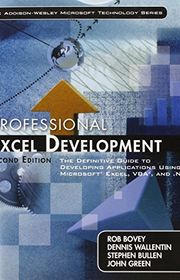
Professional Excel Development
For experienced VBA developers moving from individual macros to maintainable applications. The second edition treats architecture and integration, including .NET, more seriously than beginner guides, though its older toolchain requires substantial adaptation to current environments.
What it's about
Bovey, Wallentin, Bullen, and Green explain how to design, build, and distribute Excel applications. The second edition addresses application structure, testing, interfaces, and integration with VBA and .NET, using larger development examples rather than isolated macros.

For readers maintaining Excel 2010 workbooks or studying established macro patterns. Its case studies remain useful for understanding automation, though the version-specific interface and integration examples make it a less convenient first purchase for current Excel users.
What it's about
Bill Jelen and Tracy Syrstad teach Excel 2010 automation through step-by-step instructions, case studies, and sample workbooks. Topics include ranges, arrays, Ribbon customization, dialog boxes, error handling, and controlling other Office programs, with guidance on developing reusable macros.
Sources
- 1
100 Best VBA Books of All Time
shortform.com
- 2
Vba Books
goodreads.com
- 3
6 Best Excel VBA Programming Books
dzone.com
- 4
6 Best Excel VBA Programming Books (For Beginners & Advanced Users)
exceldemy.com
- 5
Recommended Excel books
asap-utilities.com
- 6
Best Excel VBA macro programming and development books and tutorials
excelkursdirekt.eu
- 7
VBA Reference Books
reddit.com


Edited by
Software engineer whose passion for tracking book recommendations from podcasts inspired the creation of MRB.
Lead investor at 3one4 Capital whose startup expertise and love for books helped shape MRB and its growth.
Comments
Spotted a missing book, a wrong order or a mistake? Tell us and we'll fix this page.
We're a reading guide, not the author or publisher, so we can't send books or pass on messages.