
11 Best AutoCAD Books
The best AutoCAD books, ranked by how many expert sources recommend each one, with notes on who each suits, from drafting beginners to users seeking practice.
Our take
AutoCAD books can teach the commands, guide you through complete drawings or give you exercises to solve on your own. The most useful choice depends on both your drafting background and the software release in front of you. A newer tutorial makes interface details easier to follow, while an older course book can still help when it matches a classroom or installed version.
AutoCAD 2026 Tutorial First Level 2D Fundamentals offers a recent, guided route into two-dimensional drawing. 100 AutoCAD Exercises is for practice after you know the tools, rather than teaching every step. Discovering AutoCAD 2020 develops skills through activities, while AutoCAD 2022 for the Interior Designer applies them to space planning. The larger reference-style books suit users who want to return to particular commands as projects become more involved.
Start with a guided tutorial close to your software version, then use 100 AutoCAD Exercises when you are ready to choose your own drawing procedures.
11 books · 4 sources · Last updated
As an Amazon Associate, we earn from qualifying purchases (at no extra cost to you).
How to choose from this list
Skip to the full rankingIf you're starting with a recent release: AutoCAD 2026 Tutorial First Level 2D Fundamentals
If you already know commands and need practice: 100 AutoCAD Exercises
If you're studying interior space planning: AutoCAD 2022 for the Interior Designer
If you're using the 2022 release in class: AutoCAD 2022 Instructor
If you want a broad 2021 reference: Mastering AutoCAD 2021 and AutoCAD LT 2021
If you're learning drafting through activities: Discovering AutoCAD 2020
The 11 books, ranked
Ranked by how many expert sources name each book. Ties go to the book more people recommend.
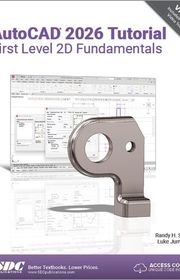
AutoCAD 2026 Tutorial First Level 2D Fundamentals
For new users who want a recent release taught through repeated drawing exercises. Its focused 2D sequence builds from simple geometry to multiview drawings, but it does not provide the substantial 3D coverage found in broader guides.
What it's about
Randy Shih and Luke Jumper introduce AutoCAD 2026 through twelve tutorial lessons. Exercises progress from basic shapes to multiview drawings, dimensions and reusable drawing elements, with accompanying videos supporting the same practical sequence for beginning CAD users.

Discovering AutoCAD 2020
For beginning drafting students who want activities, shortcuts and procedures introduced gradually. Its practice-led sequence builds familiarity through repeated work, but the 2020 interface is dated and newer features require a separate reference.
What it's about
Mark Dix and Paul Riley introduce AutoCAD 2020 as a drafting tool through practical activities. Exercises, techniques, shortcuts, and explanations help beginning students develop drawing skills while learning ways to work more efficiently within the software.

For users who already know drawing commands and want mechanical shapes to recreate independently. It supplies practice without another long tutorial, but it assumes you can choose the tools and solve problems without step-by-step instruction.
What it's about
This practice book presents one hundred mechanical drawings for users to analyze and recreate in AutoCAD. It assumes familiarity with the software and offers drawing challenges rather than step-by-step lessons, helping engineers and designers practice their existing skills.

AutoCAD & AutoCAD LT All-in-One Desk Reference For Dummies
For users who prefer separate reference sections they can consult while working. Its accessible organization makes individual topics easier to find than in a continuous project book, but the older software coverage leaves a substantial version gap.
What it's about
David Byrnes and Lee Ambrosius organize AutoCAD and AutoCAD LT into accessible reference sections. The guide covers creating technical drawings, working in two and three dimensions, reusing drawing elements, printing at different scales, and sharing finished work.

AutoCAD 2022 For Beginners
For beginners who want commands connected to worked drawings and architectural projects. Its practical examples give you a reason to use each tool, but the screenshots and instructions match the 2022 release rather than the newest interface.
What it's about
CADfolks introduces AutoCAD 2022 through concise explanations and worked examples, from navigating the interface to creating and editing drawings. Lessons cover dimensions, annotations, printing, three-dimensional models, and architectural projects such as floor plans, elevations, and construction details.

For beginners progressing toward intermediate work who want both drawing production and introductory modeling. Its broad course structure links commands with managing finished drawings, but the 2023-specific instructions need comparison with the version you use.
What it's about
This AutoCAD 2023 textbook teaches the creation, editing, plotting, and management of two-dimensional engineering drawings and three-dimensional models. Thirteen chapters cover drawing aids, layers, dimensions, text, blocks, external references, and layouts for classroom or independent study.

For interior-design students who want software skills taught through a space-planning project. Its hotel-suite focus gives commands a consistent purpose on Mac and PC, but its 2022 interface and disciplinary scope limit its value as a general reference.
What it's about
Dean Muccio teaches AutoCAD through interior space-planning tutorials centered on a hotel suite project. Designed for students without prior experience, the book progresses from basic commands to complete drawings and covers both Mac and PC versions.

AutoCAD 2022 Instructor
For students who want systematic explanations organized around related commands. Its classroom-style sequence also supports later lookup, but the extensive coverage takes time and this edition’s procedures match the 2022 software release.
What it's about
James Leach and Shawna Lockhart organize AutoCAD 2022 instruction around related commands, beginning with fundamental drawing skills and advancing to specialized applications. Illustrated explanations support classroom learning, independent study, and later reference when locating specific procedures.

For learners who want two-dimensional commands applied across several drafting disciplines. The varied chapter projects offer more context than isolated command lists, but its older interface and emphasis on 2D make it narrower than a current comprehensive course.
What it's about
Paul Richard introduces two-dimensional drawing commands and procedures in AutoCAD 2020 through illustrated explanations and progressive exercises. Chapter projects apply the skills to mechanical, architectural, civil, and electrical drawings, connecting software operations with practical drafting tasks.

Mastering AutoCAD 2021 and AutoCAD LT 2021
For learners who want a substantial tutorial that can become a desk reference later. Its coverage reaches beyond basic drafting into blocks, customization and modeling, but the size and 2021-specific instructions make it less convenient for a quick start.
What it's about
Brian Benton and George Omura teach AutoCAD and AutoCAD LT through examples and downloadable projects. Coverage moves from interface basics to drawing production, dynamic blocks, customization, and three-dimensional modeling, with material supporting preparation for Autodesk certification.

Practical Autodesk AutoCAD 2021 and AutoCAD LT 2021
A No-Nonsense, Beginner's Guide To Drafting And 3D Modeling With Autodesk AutoCAD
For beginners who want a practical route from drafting into three-dimensional work. Its examples connect modeling to familiar plans and project tasks, but the 2021 versions and mixed coverage mean checking which features apply to your software.
What it's about
Yasser Shoukry and Jaiprakash Pandey introduce AutoCAD drafting and three-dimensional modeling through practical instruction. The guide covers drawing tools, project management, modifying models, and developing three-dimensional work from two-dimensional plans, using the 2021 versions of the software.
Sources













Edited by
Software engineer whose passion for tracking book recommendations from podcasts inspired the creation of MRB.
Lead investor at 3one4 Capital whose startup expertise and love for books helped shape MRB and its growth.
Comments
Spotted a missing book, a wrong order or a mistake? Tell us and we'll fix this page.
We're a reading guide, not the author or publisher, so we can't send books or pass on messages.